



If you’ve been wondering, “Does GEOfinder really work?”, the short answer is yes, and, frankly, it is really one of the most effective solutions available on the market today. What makes it stand out isn’t just the result, but how simple and fast the whole process feels compared to traditional tracking methods.
What Is GEOfinder and What Does It Claim to Do?
To answer “What is GEOfinder?”, think of it as a modern, web-based phone number tracking tool available through GEOfinder.mobi. Unlike traditional tracking apps, there’s no need to install anything on the other person’s device, which already makes it far more flexible.
How Does GEOfinder Work? The Mechanics Explained
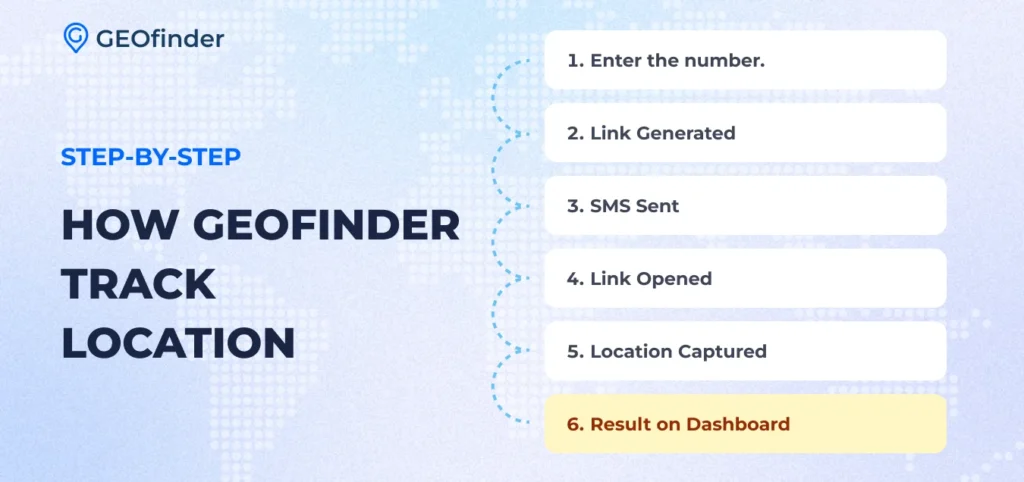
The tool is built around a smart link-based system. How does GEOfinder work? Enter a target cell phone number on GEOfinder.mobi, wait a moment while the system generates a special tracking link, and send it via SMS. Once a recipient clicks the URL, the location data is securely captured via GPS or IP address and displayed in your user dashboard.
No downloads or technical setup are needed. No need for a traditional GEOfinder app installed on the target device, jailbreaking, or rooting, which are common requirements for most cell phone trackers. This web-based tool supports all cell phone models, carriers, and networks, and it does not matter how far you are from the target person.
When GEOfinder Works Well
When does GEOfinder perform at its best? The ideal condition is actually quite simple. The person you’re trying to locate should be using a modern smartphone with GPS or location services enabled.
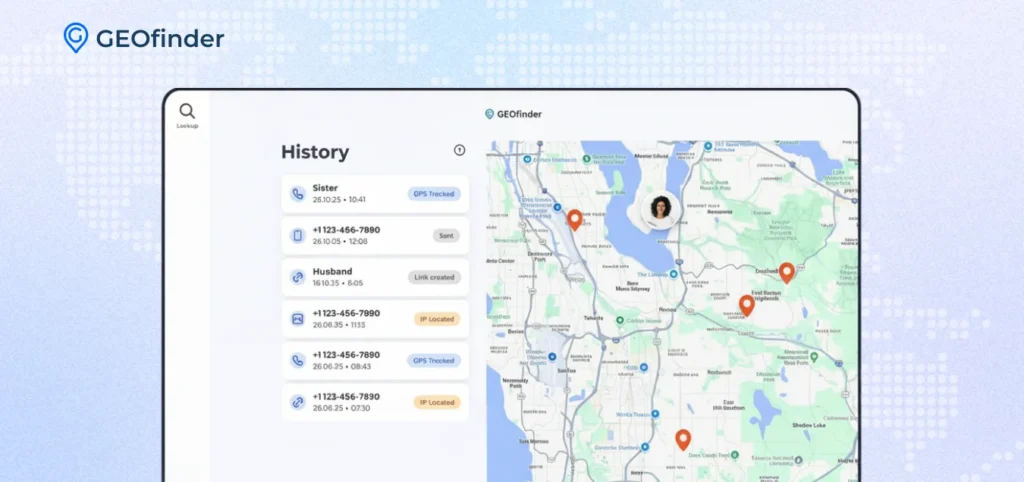
The second (and most important) factor is link interaction. Once the recipient opens the tracking link, their device can share location data, enabling the system to generate accurate, near-real-time results. When these two conditions are met, GEOfinder runs quickly and smoothly, delivering precise location information for the target cell phone.
When GEOfinder Doesn’t Work (And Why)
Even though the tool is highly effective and legitimate, it’s still important to understand its limitations (every tool has its boundaries, and the GEOfinder app is no exception).
How does GEOfinder work if the link is not clicked? If the link isn’t opened, no data can be collected. That’s how the system is designed. In some cases, if GPS is turned off, the tool switches to IP-based tracking, which still provides useful location details, just with slightly less precision.
How Accurate Is GEOfinder’s Location Data?
A big part of answering “Does GEOfinder really work?” comes down to accuracy, and the tool performs impressively well when used under the right conditions.
When GPS is enabled on the target device, GEOfinder can deliver highly precise results, often within 10 meters. This level of precision is especially useful when you need clear, actionable information rather than rough estimates.
How does GEOfinder work if GPS access isn’t available? GEOfinder switches to IP-based tracking. This method is less precise, typically showing a general area (such as a district or city), but it still provides valuable context for where the person might be.
It’s also worth noting that accuracy can vary depending on real-world factors. Outdoor environments with a strong GPS signal deliver the best results, while indoor settings or restricted location permissions may slightly reduce precision.
How GEOfinder Compares to Other Tracking Methods
When you compare different free and paid tracking options, it becomes much clearer why GEOfinder stands out.
GEOfinder vs Find My (iOS)
When comparing GEOfinder to Find My iPhone, the most significant difference lies in setup and access. Apple’s tool is highly accurate and reliable, but it only works within the Apple ecosystem and requires iCloud access (Apple ID and password), device linking, and pre-enabled location sharing. If these conditions aren’t met beforehand, tracking simply won’t work.
GEOfinder, on the other hand, removes that limitation entirely. It doesn’t require access to someone’s account or device. Instead, it uses a simple SMS link that, once opened, enables location detection. It makes it far more flexible in real-life situations, especially when you need quick results. While Find My is great for personal device tracking, GeoFinder is better suited for one-time or situational use.
GEOfinder vs Find My Device (Android)
When comparing GEOfinder with Google’s Find My Device, the most significant difference lies in flexibility. Find My Device is tied to a Google account and only works if the target phone is already connected, powered on, and has location services enabled. It’s a great built-in solution for finding your own lost Android device, but it requires prior setup and access to the account.
GEOfinder, on the other hand, doesn’t depend on any pre-installed apps or account logins.
GEOfinder vs. Google Maps Location Sharing
Compared to Google Maps, GEOfinder offers a more immediate and flexible approach. Google Maps location sharing works well, but only if the person has already shared their location and keeps it enabled. Without that prior setup, there’s no way to access their real-time location.
GEOfinder eliminates that dependency. There’s no need for ongoing permission settings or account connections. The process is straightforward: send a link, and once it’s opened, location data becomes available. It makes GEOfinder particularly useful in situations where you don’t have pre-established access.
GEOfinder vs. Carrier-Based Tracking
Carrier-based tracking, offered by mobile network providers, operates very differently from GEOfinder. These services are typically restricted and often require legal authorization or involvement from authorities.
GEOfinder provides a much more accessible alternative. It’s designed for anyone who needs a simple and quick way to determine a device’s location without installing an app. There’s no need to contact a provider or submit formal requests. Everything happens online, through a link-based system.
Overall, GEOfinder stands out as the most practical and reliable solution, working without the usual setup barriers or adjustments required by most location-tracking tools.
Also, GEOfinder provides additional features like reverse phone lookup, username lookup, name search, lost phone finder, and email hack check.
And the best part is you can try all of GEOfinder’s features for just $1.


Comments